
A multi-day event is an event, such as a conference or workshop, that takes place over the course of more than one day.
You add multi-day events the same way you add any other event but, in addition, you specify an end date and, optionally, an end time. For example, see the event Inspiration from Isolation - Online Fine Art Competition in the image below:
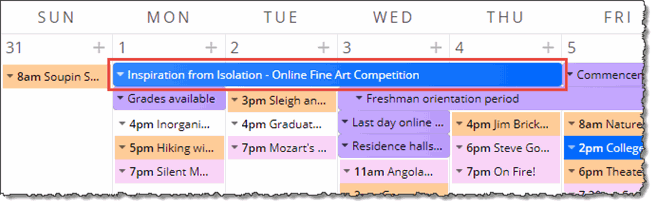
Editing environment: How a multi-day event looks in Month view
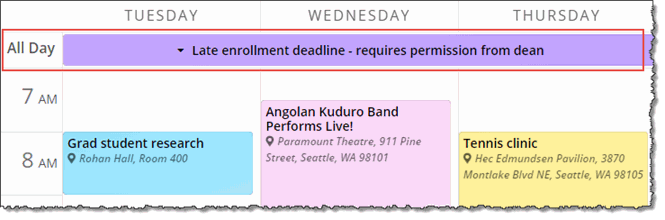
Editing environment: How a multi-day event looks in 3-day view
Terminology - see also: What's the difference between repeating, multi-day, and ongoing events?
Multi-day events (covered in this topic) are single events of any duration that occur over multiple days.
Ongoing events are single events with an all-day duration that span multiple days. In this way, "multi-day events" that have an all-day duration are also "ongoing events" (see Add ongoing events).
Repeating events can be of any duration, even spanning multiple days, and are copied in a repeating pattern over multiple occurrences (see Add repeating events).
Infographic illustrating the difference between repeating, ongoing, and multi-day events:

Help with setting up a "special case" multi-day event.
or
Instead of specifying a start and end day and time, you can select All Day and specify the duration in number of days.
See also: Also shows on vs. mixing in.
Tip DO NOT use the Repeat option when setting up multi-day events.
You can control how multi-day events display on your published calendars using the calendar view settings that you access from the Publishing Control Panel, on the Calendar Spuds tab.
This section focuses on the two settings that affect the display of multi-day events the most: Include events that started in the past and Label ongoing events.
Tip The settings that affect multi-day events are not relevant for, and therefore not available with, all calendar views.
I'd like more details about how to set up calendar views.
The following image shows a multi-day class called, Multi-day event, displayed in a 3-column calendar view. The image illustrates the two most important settings related to multi-day events.
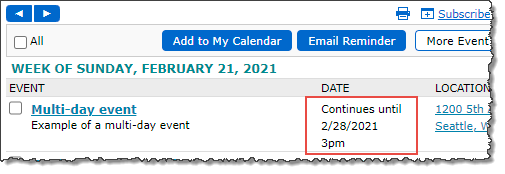
A multi-day workshop displayed in a 3-column calendar view
Assume you're viewing the calendar on February 26, the second day of the Multi-day event class.
Even though the class started in the past, it still displays on the calendar because the Include events that started in the past calendar view setting is selected.
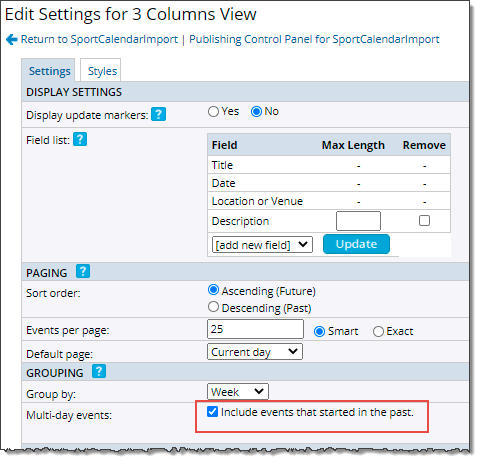
Selecting Include events that started in the past means that multi-day events still display even after their start dates have passed.
Tip For list-type views, such as List, Classic Table, Compact List, or 3 Column, selecting Include events that started in the past also means that multi-day events will be repeated in each event grouping (for example, week or month) in which they fall. Learn more about grouping options for calendar views.
To make it clear when events span multiple days, you can add labels to multi-day events. You can use the default label (Ongoing through), or, as shown here (and outlined in red in the calendar above), add your own custom label (Continues until).
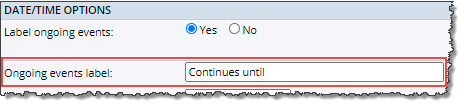
Setting multi-day events to be labeled and customizing the label to say Continues until.
