
You can add events to your Trumba® calendars that repeat on a daily, weekly, monthly, or annual basis. Repeating events don't have to occur every day or every week. For example, you can set up an event that repeats every 7th week on Thursday, or every 5th day.
Terminology - see also: What's the difference between repeating, multi-day, and ongoing events?
Repeating events (covered in this topic) can be of any duration, even spanning multiple days, and are copied in a repeating pattern over multiple occurrences.
Ongoing events are single events with an all-day duration that span multiple days (see Add ongoing events).
Multi-day events are single events of any duration that occur over multiple days (see Add multi-day events).
Infographic illustrating the difference between repeating, ongoing, and multi-day events:

You can add a repeating event the same way you add any other event to a calendar (see Add events) but, in addition, you can set up a repeating pattern.
Tip To set up a quarterly event, for Repeat, choose Monthly, and then, for Every, choose 3rd month, such as in this example:

Note Even when you select No end date, there are limits to how far into the future recurring events can last. Daily or weekly events have a two-year limit. Monthly events have a 20-year limit. Annual events have a 200-year limit.
Important You can't convert one-time events that already have one or more registered attendees to become repeating events.
You can change the event title, location, start time, duration, end date, description, and web link, and then apply the changes to just one event in the repeating pattern or to all events that follow.
You can't change the pattern for a repeating event, however, after it's been set up. See: To set up a new repeating pattern for an event.

When Clear exceptions on future occurrences is checked, any exceptions that have been previously made to future occurrences will be overwritten and all event details will be forced to match the occurrence you've just changed.
When Clear exceptions on future occurrences is not checked, any exceptions on future occurrences will remain and will not be overwritten.
To change the pattern of a repeating event after it's been set up, you need to create a new event.
Or
If customers have interacted with the original event (by registering for any occurrences, or adding any occurrences to their personal calendar), best practice is to cancel rather than delete the events (see How to cancel and uncancel events).
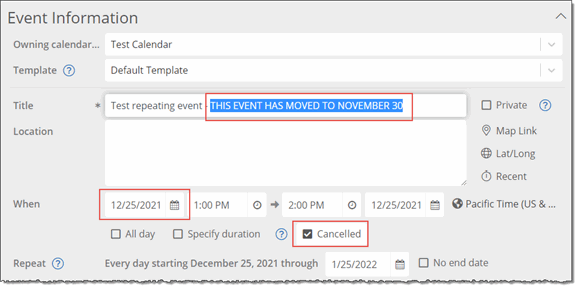
This sends registrants a cancellation email, and indicates to calendar visitors what's happened with the original event.
If you have any questions or concerns about this, contact Trumba Support.
If there hasn't been customer interaction with any of the occurrences of the original repeating event that you want to delete, you can delete all occurrences at once, just one occurrence, or all occurrences beyond a specific date (see How to delete events).
If there has been customer interaction with any of the occurrences of the event, it's better to cancel the event, following the steps under To set up a new repeating pattern for an event, and then the steps under If customers have interacted with the original event.
All of the events past the new end date are deleted.
