
When you use paid registration, transaction fees are incurred when visitors register and submit payment. You can view a monthly report of these fees from a Trumba® primary publisher account.
Important For the Stripe payment gateway, registration transaction fees are calculated and charged as part of the transaction. The fees are refunded automatically if the transaction is refunded.
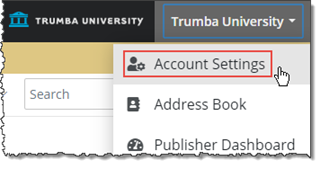
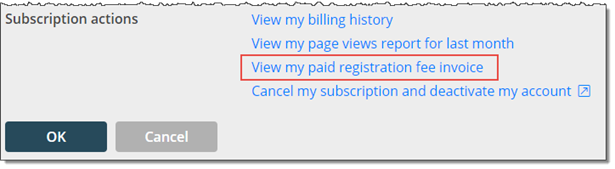
The transaction fee invoice shows the current month by default. A message appears in red to indicate that the report reflects only the transactions made from the first of the month to the current date.
Note The list includes only the months during which there were monetary transactions on calendars.
In the report hierarchy, transactions are categorized by calendar. If you have more than one publisher account, the report groups calendars by account.
The following image shows a simple report example for a fictional medical center.
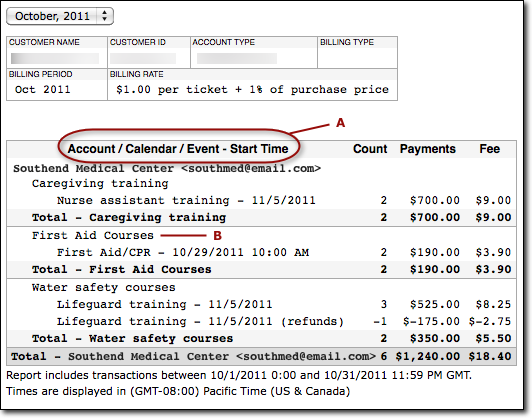
For each calendar, items are grouped by each event and its refunds. The Count column shows the number of attendees that have registered for the event or the number of refunds. If an attendee cancels registration and requests a refund, your transaction fee is also removed. The Total count for the calendar shows the number of attendees currently registered for events owned by that calendar.
Note The report reflects events’ names, dates, and times at the time the visitor registered and paid for the event. If you rename the event or change the time or date, another item is added to the report, as if it were a separate event.
Tip For more comprehensive attendance information about an event, open the event and view the Registration tab. Or, view the Registration Report: on the main page of your Trumba editing environment, under Tasks, click Registration Report.
