
The list of choices field type lets you define a list of field values available to Editors who create and update events. Editors select only from the specific list of values you define. This simplifies event entry and ensures the use of consistent values across events.
How do I set up a List of Choices custom field?
List of choices field values are stored differently from other field-type values. It's important to understand how these values are stored so you understand how changes to the values impact existing events.
The list of choices values you create are stored in a separate data table. Each text value is assigned a unique ID number. When an Editor selects a field value for an event, only the value's unique ID number is stored in the event. When the value needs to be displayed, the system automatically looks up the display value using the unique ID number.
The advantages of storing field values separately from events include:
For example, you can associate an image with each value so you can display icons next to fields in published views. Or, you can link field values to webpages where visitors can find additional information.
I'd like to know more about using custom field icons.
I'd like to know more about converting custom field values into links.
After using a List of Choices field for a while, you may find that you no longer want Editors to assign one or more values to events. You have two choices for values you no longer need. You can:
Use when you want to leave the value in place for existing events but discontinue using it for future events.
Tip Disabling is typically the safest choice if you want to make sure you don't affect existing events.
Use when you want to clear the value from all existing events as well as discontinue using the value for new events.
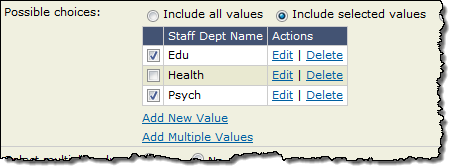
Select check boxes for values that you want to continue to use for new events.
Clear check boxes for values that you want to continue to use in existing events but not in future events.
