
Trumba uses a default 24-color palette to assign colors to calendars in the Trumba editing environment. You can see that palette by clicking the down arrow to the right of a calendar's name in any of the editing enviroment's calendar lists.
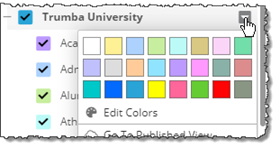
Click the down arrow to see the default color palette.
To replace one or more of the default colors with your organization's brand colors or other colors you prefer, click Edit Colors to open the Edit Calendar Colors window.
While you can reset the Edit Calendar Colors window so that all your color changes revert to the defaults, at times you might want to change just one color back to its default. The following information about the default palette's hexadecimal color values will help you do that.
The following image shows the color palette, with each color numbered. The table below the image lists the hex value for each color number.
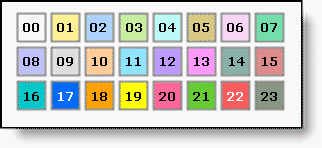
| Note Except where indicated in the table, the default event text, link, and hover color is black: hex #000000. | |
| Trumba Connect color number | Hexadecimal value |
|---|---|
| 00 | #ffffff (white) |
| 01 | #fef094 |
| 02 | #add2fe |
| 03 | #c7ed9e |
| 04 | #bbfaf7 |
| 05 | #d9c883 |
| 06 | #fad5f7 |
| 07 | #72deaa |
| 08 | #c0c0fd |
| 09 | #dddddd |
| 10 | #ffcc99 |
| 11 | #91e4ff |
| 12 | #bc9aff |
| 13 | #ff99ff |
| 14 | #90b1a7 |
| 15 | #dd8c8e |
| 16 | #00c7c8 |
| 17 | #026afe
(with text, link, and hover color #ffffff) |
| 18 | #ffa200 |
| 19 | #ffff00 |
| 20 | #ff6699 |
| 21 | #66cc33 |
| 22 | #fb5d5d
(with text, link, and hover color #ffffff) |
| 23 | #899684 |
