Performance Schedule calendar view
Use when your goal is to
- Promote repeating events, such as classes or workshops, and make it easy for visitors to see, register for, and/or take event actions on multiple occurrences at once.
Don't use when your goal is to
- Group events by time period, such as by week or month.
- List events in descending order, with latest events displayed first.
- Present event information in a traditional calendar format.
Description For specific date ranges, groups occurrences of repeating events that have the same descriptions and locations.
Events are organized on the page by date, starting with the current day. The number of occurrences listed with each event is determined by a date range, which you can't control.
Note Date ranges are a function of how Trumba® Connect database queries work.
You control the number of events listed per page by specifying the total number of occurrences (for example, 1000) a page displays.
Example
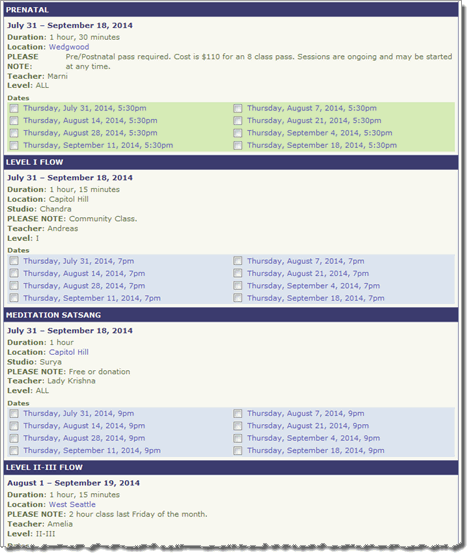
Settings to notice
- Events are listed in ascending order by date (the start date in the automatically determined date range associated with each event).
- The event title appears in a colored bar at the top of each event entry. Immediately below the title you see the date range.
- For each event, you see only the occurrences that take place within the specified date range.
There may be additional occurrences both before and after the specified dates.
- You can control which event fields to display and the order in which they appear.
In this example, the publisher chose to display a number of fields, including duration, location, notes, and more.

