
When you create a calendar in your Trumba account, you have an opportunity to define the calendar's relationship to other calendars in one of two different ways. You can make the calendar either a top-level calendar or a sub-calendar. This topic:
Top-level calendars and sub-calendars behave in exactly the same ways. The difference between them is purely visual, that is, how they appear in the calendar list in the Trumba Connect editing environment.
Top-level calendars have no specific relationship to any other calendars. You can still mix them into other calendars but, visually, they stand alone.
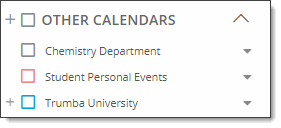
These three top-level calendars are independent of each other.
Visually, sub-calendars appear as children of (indented under) a parent calendar.
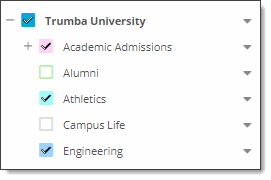
In this example, Academic Adminssions, Alumni, Athletics, Campus Life, and Engineering are indented under their parent, Trumba University, indicating a relationship.
Please tell me how to create new top-level calendars and sub-calendars
Sub-calendars make the most sense when you're publishing different categories of events. You can create a separate sub-calendar for each category. When you publish an empty top-level calendar, you can mix in the sub-calendars that contain events.
Giving each category its own calendar makes it easier to manage the separate schedules and provides visual confirmation that all the schedules have to work together.
For example, suppose your organization offers product seminars.
| Situation | Solution |
| One product for which you offer one type of seminar | Create and publish one top-level calendar that contains the seminar events |
| One product for which you offer several types of seminars. |
The top-level calendar acts as holding calendar under which the sub-calendars are organized and published.
|
