
This topic describes the event submission process, from the time an event is submitted until it appears on a live calendar, and recommends best practices if you've decided to set up an approval process.
How do I decide whether or not to approve submitted events?
If you're providing an event submission form on your website, we recommend that you go through the process of submitting a test event yourself so you can experience it both as the submitter and the approver/calendar editor.
Tips
If you don't add a custom message, a default message says approved submissions appear online within 48 hours.
Tip Because without an approval process in place, submitted events go live immediately, it's usually a good idea to set up submitted events to require review and approval first (as described later in this topic). Learn more.
After submitters click Submit, a confirmation email message is automatically sent to the email addresses they provided -- along with their names, phone numbers (if you made phone number a required field), and event information.
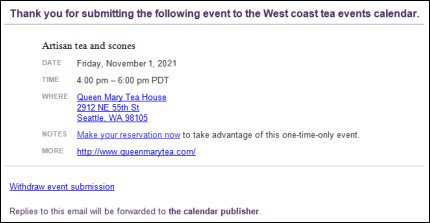
Submitters receive confirmation email messages similar to this one.
By default, confirmation emails contain Withdraw event submission links that give submitters the opportunity to withdraw or cancel events they submitted. You can customize event submission emails to omit that option if you prefer.
For more information, see: What happens when submitters withdraw or cancel events.
For information about Event Actions, see Event actions options.
If editors have questions about the submission, they can reply to the notification email to contact the event submitter.
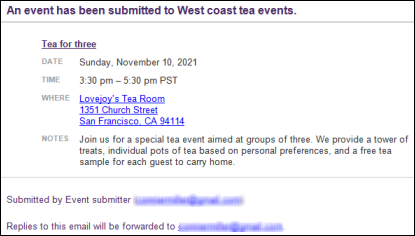
Designated calendar editors receive notification messages each time an event is submitted.
Note You can also notify specified event editors when Trumba account holders add, move, or bulk move events to the submitted sub-calendar. See Set up an event submission form.
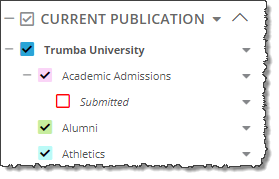
Or, if the events don't meet submission guidelines, editors can delete them from the sub-calendar.
Important No email messages are sent automatically to event submitters to let them know their events are live (or will not go live). Calendar editors can reply to the notification messages they receive if they want to keep submitters informed.
Or
Submitters (who sign in) can go to My Submissions in the Event Actions web app to see whether their submission is pending, has been accepted, or has been rejected (deleted). For more information, see Visitor accounts: an overview.
We recommend using this approach to add submitted events to the live calendar after approval. This approach allows you to distinguish between events you've approved and those waiting for approval, plus keep track of how many events are being submitted and who submitted them.
Notice the Submitter Email and Submitter Name fields that are added automatically on the add/edit event form for submitted events. (If you require submitters to provide their phone numbers, you'll also see the Submitter Phone field.)
These fields are hidden and are never published with events.
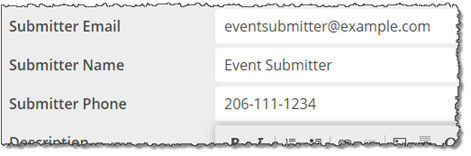
Submitter ... fields appearing on submitted events.
These fields make it easy to track submitted events. For example, you can export the published calendar, and then sort by one of the Submitter fields.
This moves the event you're approving from the Submitted sub-calendar to the live calendar.
If a submitted event includes an image, a lot of text in the Description field, or any other unusual characteristics, it's good to preview the event before you approve it.
When you publish (but don't embed) a calendar, the calendar is hosted on the Trumba domain (known as the Trumba hosted view). See Publish calendars.
If you publish the Submitted sub-calendar, you can preview submitted events on the hosted view before approving them for the live calendar.
I'd like more information about controlling access to the Submitted sub-calendar.
How do I copy settings and styles from one publication to another?
Tip If the live publication you copied from is searchable, be sure to set the Submitted sub-calendar back to unsearchable after you finish copying. Tell me how.
The hosted view opens in a new window.
If you published multiple views, use the View Chooser spud to preview the event in each view.
Click the event title to preview the event detail view.
Tip If you've optimized your calendar for mobile, it's best to also preview the submitted event on a mobile device. In the Publishing Control Panel, click the Calendar Spuds tab. In the Main Calendar Spud section, click Edit Styles & Settings. For Enable mobile calendar view, select Yes, and then click OK. On the Hosted View tab, find the hosted calendar URL, and then use a browser on your mobile device to navigate to the URL to open the hosted calendar page.
Submitters can withdraw or cancel their submissions either by:
Tell me more about visitor accounts and the Event Actions web app.
When you customize the event submission email, you have the option to provide or omit a Withdraw event submission link from the confirmation email that submitters receive.
Note If a submitter withdraws an event prior to approval, the event is deleted. It no longer appears in the Trumba editing environment. If the submitter withdraws the event after it's approved, the event is cancelled. It's labeled as Cancelled in the Trumba editing environment.
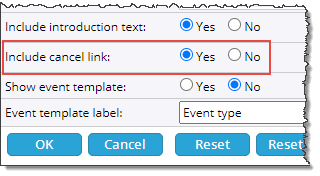
Option to provide or omit a Withdraw event submission link. Select No to omit the link.
How do I open the form where I set the withdraw and other event submission email options?
If you provide the link, the withdrawal process starts when, in the confirmation email they receive, submitters click Withdraw event submission. In the Event Status section of the webpage that opens, submitters see the submission status and an action button (unless the status is Deleted).
Learn more about submission status and action buttons.
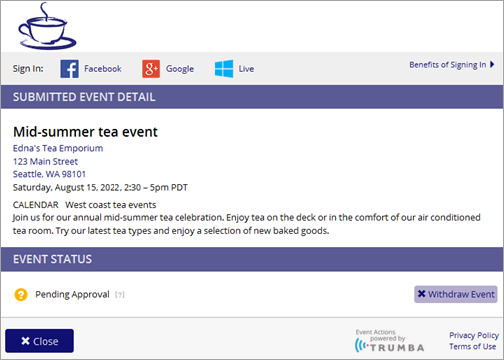
Webpage with submitted event details, submission status, and action button
Submitters with visitor accounts who sign in to submit events can manage their submissions by navigating to the My Submissions page in the Event Actions web app.
I'd like more information about visitor accounts and the Event Actions web app.
On the My Submissions page, submitters see the status of each of their submissions and have the opportunity to withdraw or cancel each submission.
Learn more about submission status and action buttons.
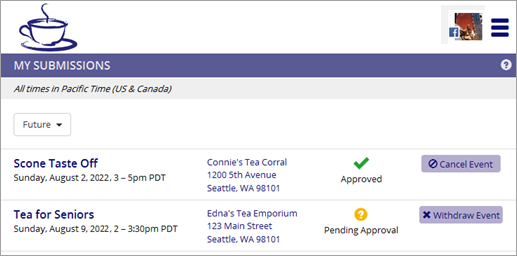
My Submissions page, Event Actions web app
Event submitters see one of three statuses, depending upon the actions you as the calendar owner or editor have taken.
Note Submissions signed-in visitors withdraw stay in their My Submissions lists and are marked as Deleted.
