New Event Submission Form
Note Learn more about event submission forms either by emailing or calling your Trumba Sales representative. Your representative will discuss the process for getting the event submission form and help you determine the best way to implement it on your site.
What you can learn in this topic
Event Submission Form improvements
There are a number of improvements made to the Event Submission Form:
- Modern design - the completely rewritten form provides a more modern design and functionality.
- Mobile responsive - field labels now automatically move above the fields on narrow displays.
- Improved performance - the form no longer needs to reload when making selections such as category calendar or event template.
- Improved styling - the form now inherits styles from the published Base Calendar Styles and includes more fine-tuned style settings.
- Location overrides support - you can now enable location overrides to allow submitters to type a location instead of picking from a list.
- Improved Preview availability - you can now Preview the form from the Settings and Styles tabs.
Modern Design
The new Event Submission Form incorporates the same design esthetic as the Trumba editing environment.
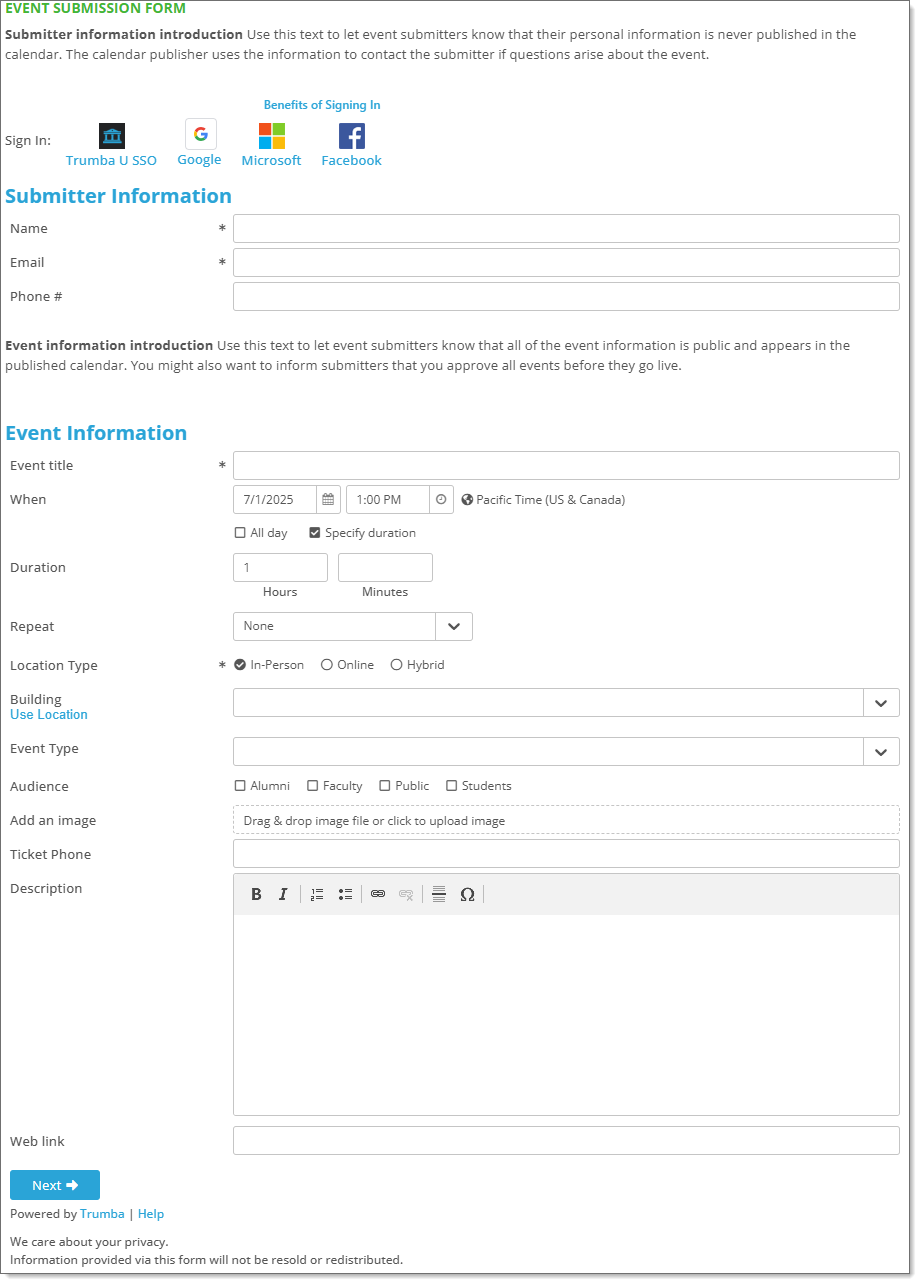
For more information about how to customize the new form, see Set up an event submission form.
Mobile Responsive
Because the field label placement is now responsive based on the width of the display, the Labels and Fields options (Horizontal, Vertical) on the Settings tab have been removed.
For wider displays, the labels will be to the left of the fields; for narrower displays (mobile view), the labels will be above the fields.
On the Styles tab, the Mobile breakpoint setting allows you to designate the width at which the mobile view is enabled.
Improved Styling
There are more specific styling options available on the new Event Submission Form. The default styles are inherited from the calendar's base style settings.
On the Styles tab, you can customize:
- Form Styles - Background color, maximum width, and mobile breakpoint
- Sign In Text Styles - Text styles for the Sign-in options
- Submitter Information Header Styles - Text styles for the Submitter header label
- Event Information Header Styles - Text styles for the Event Info header label
- Custom Message Styles - Text styles for the Message before Submitter Info, Message after Submitter Info, Message before Event Info
- Field Label Styles - Text styles for field labels (on both the Event Information and Event Preview pages)
- Field Value Styles - Text styles for field values (on both the Event Information and Event Preview pages)
- Field Description Styles - Text styles for the field descriptions
- Error Styles - Text styles for error messages
- Link Styles - Text styles for the Help link and web links
- Button Styles - Text, color, border and more styles for the Next, Back, Submit, and Submit Another Event buttons
- Privacy Message Styles - Text styles for the privacy message
Location Override Support
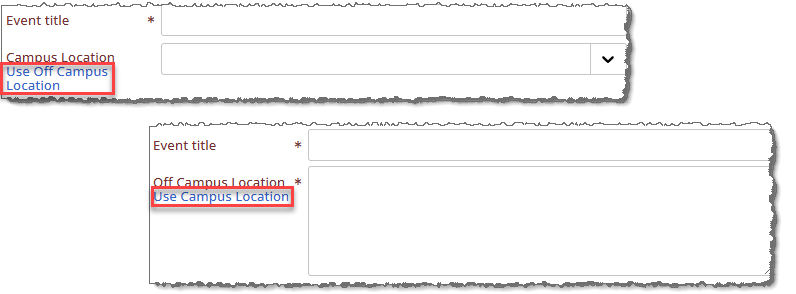
The Event Submission Form now allows location overrides (as used in the Trumba editing environment).
This new feature allows submitters to enter a location rather than choosing a value from a list. For example, you can now use just one template for both on-campus (selecting a campus location from a list) and off-campus (entering a location) events.
Improved Preview availability
When designing or updating your form, you can now make a setting or style change and use the Preview button to view the changes before saving them.
On either the Settings or Styles tab, click the Preview button to view the form with the new settings. You can also still use the Preview link from the Event Submission Form tab
Note When you are happy with the changes, be sure to click
OK to save the changes.
Enable the new Event Submission Form
To use the new Event Submission Form, check the Enable New Submission Form box on the Event Submission Form Settings page. A few things to note when upgrading:
- Because of the new Form Styles settings, any previous width and background colors specified in the spud code will be ignored so you do not need to change the spud code on your website.
- Because the new form inherits base styles from the calendar styles, this will override changes you have made to your current form settings. Please use the Preview feature to review how the new form will look.
- If you have a large number of Event Submission Forms, contact Support for assistance in upgrading the forms so you don't have to update them individually.
If you have any questions or need assistance in upgrading your Event Submission Form, please contact Support.