
One of the most important steps in the Trumba® Connect implementation process is identifying the combination of templates, fields, and possibly calendars that will best organize and present your events.
Making the right decisions when you implement is key because it effects how your site visitors find events they care about and how easy it is for you to expand or modify your implementation in the future.
In most cases, you will work with Trumba Client Services to make these implementation decisions. But the discussions will go a lot better if you bring to them some sense of the role that templates, fields, and calendars play. That's what this topic is for.
In most cases, you can manage all of your events using one calendar, one event template, and a few custom fields. But there are exceptions so it helps to understand the function each of the key tools performs.
Before we get into describing each tool, it's worth it to step back and think about events in general. Typically, the events an organization sponsors or publicizes fall into different categories. For example:
In addition, there may be interrelationships among the categories. For example, the Community Events calendar might include Sports and Outdoor events aimed at each of the different age groups.
Planning your Trumba Connect implementation involves:
Tip As you name templates, fields, and calendars, keep in mind that the names are not for internal consumption only. Visitors to your website who interact with your published views see these names in a number of public contexts.
When you think about presenting different categories of events, the obvious impulse is to create a new calendar for each category. In Trumba Connect, that usually isn't always the best approach to follow.
Many organizations can manage all of their events using one calendar and their event categories using an event template and custom fields.
However, as the following list indicates, calendars do have special capabilities. If your implementation requires one or more of these capabilities, you will want to create multiple calendars.
For example, a library might provide editors from each branch with secure access to that branch's events.
For example, a university might provide one all-inclusive calendar on its home page. In addition, each departmental website might include its own calendar with a unique color and font scheme.
Tip If all of the calendars on your website have the same look and feel, you don't need separate calendars. With filter views, you can publish subsets of events in different sections of your site.
For example, each department at a university might want to provide email subscriptions for its students, faculty, and alumni.
For example, visitors to a large museum calendar might want an easy way to immediately distinguish children's events from events aimed at adults.
Tip An even more elegant way to make it easy for visitors to quickly identify events of interest is to associate different categories of events with different custom field icons.
Note that it's best to err on the conservative side by creating as few calendars as possible. Before you decide that multiple calendars are your best solution, talk through your implementation with your Trumba Connect representative.
An event template is a collection of custom fields that describes an event.
Each Trumba account comes with a default template already in place. This default template includes a collection of general fields, such as title, description, location, event image, and start date/time, that apply to all events.
You can rename the default template and customize it by adding fields specific to your organization's events. This flexibility means that a single template is usually all you need to describe all of the event categories your organization offers.
For example, here is the renamed default template for a Community Events calendar:
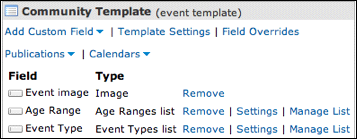
This single template with three custom fields supports a range of event types aimed at different age groups.
The event template determines what you see in the add/edit event form when you add events to the Community Events calendar.
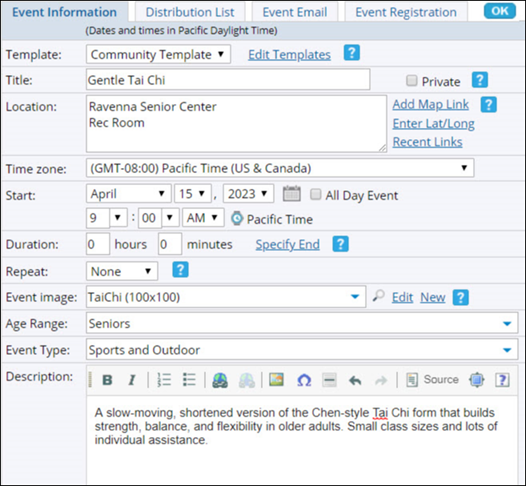
Completed add/edit Event form for a Sports and Outdoor event aimed at Seniors.
As you can see from this example, you can handle a number of event categories by adding custom fields to a single event template.
There are times, however, when a single template isn't enough. Use this rule of thumb:
For example, compare the following two public library events. To adequately describe the Book Group and Homework Help event categories, the public library had to create two event templates with two different sets of custom fields.
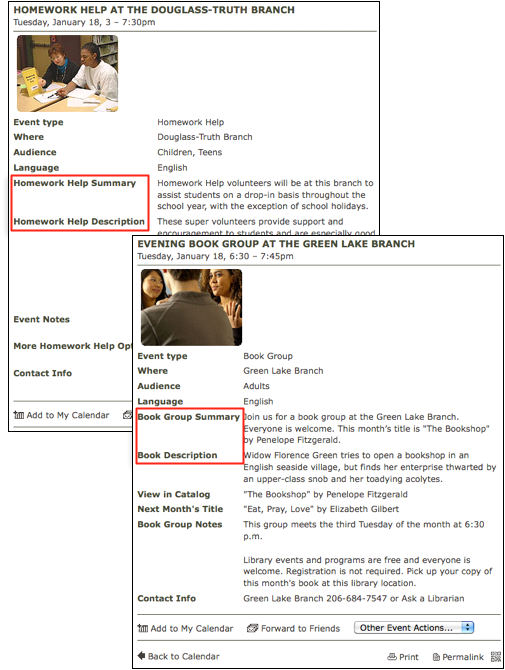
Book Group and Homework Help events.
I'd like to know more about creating event templates.
If you read the previous description of event templates, you already know that custom fields are properties you add to templates to customize them.
Because each custom field represents a piece of descriptive information about an event, when you add these fields to an event template, you turn a general event into a specific event tailored to meet your organization's unique needs.
But custom fields are more than descriptive. Custom fields give you the power and flexibility to:
I'd like to know more about creating custom event fields.
An effective way to determine which custom fields you need is to ask yourself what filters your calendar visitors might use to zero in on relevant events. Then, you can create a field that corresponds to each filter.
When you publish the calendar, you can associate each custom field with a filter control spud that gives visitors the ability to control which events they see.
For example, in a Community Events calendar, visitors might filter events by:
The following image shows a demo Community Events calendar that includes three events that recur monthly. Custom fields appear in the event list (1) and as filter control spuds (2) that visitors use to filter events.
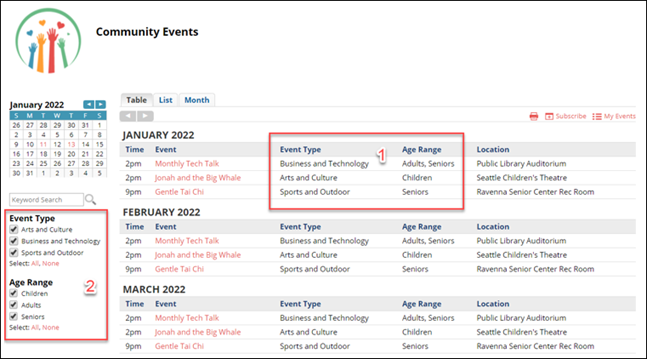
Custom fields appear in published events (1) and as spuds (2) that give visitors control over the event display.
I'd like to know more about using custom fields to create filter spuds.
Using custom fields to represent event categories allows you to associate icons with those categories and then display the icons in a variety of published views.
Icons add a rich visual element that makes it easy for site visitors to categorize events at a glance.
For example, in this museum calendar, icons appear in the calendar view and in the filter control spud on the left.
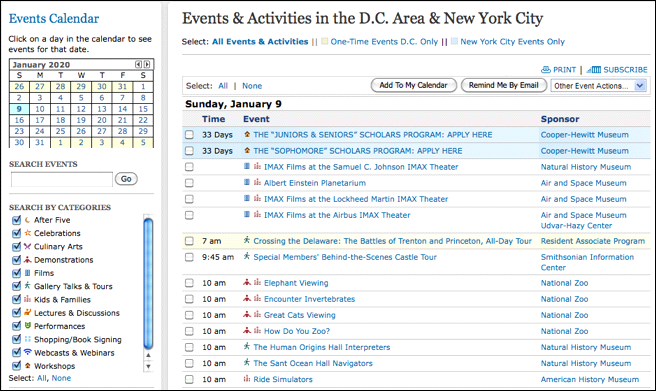
Custom field icons allow visitors to quickly identify the event types they want to attend.
I'd like to know more about adding and displaying custom field icons.
Using custom fields to represent event categories allows you to control the order in which the categories appear in the:
By default, custom field categories are listed alphabetically. In many cases, an alphabetical order makes sense. There are times, however, when a custom order might speed up the event creation process and make it easier for calendar visitors to quickly scan a category list.
For example, a local TV station that publishes an events calendar on its website might create a venues types field that includes categories such as church, museum, library, school, and sports facility, as well as Other. To speed up the event creation process, the station might want Other to appear at the end of the list rather than alphabetically under "o."
Or, in an Age Range filter, a community events organization might want the age categories to be listed from youngest to oldest (children, teens, adults, seniors) rather than in alphabetical order.
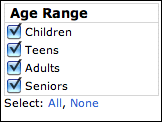
An Age Range filter spud with an age-based custom sort order.
I'd like more information about setting up custom sort order.
When you use custom fields to represent event categories, you have the option of associating a web link with each custom field value. This gives calendar visitors easy access to additional information.
For example, a university health system might offer publicly available stress reduction classes. To allow calendar visitors to learn more about class facilitators, the health system can associate a web link with each facilitator's name, giving visitors immediate access to each facilitator's biographical information.
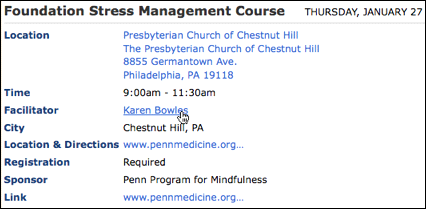
In the event detail, the facilitators name links to a page containing biographical information.
