
Note To learn more about custom objects, contact Trumba Customer Service. Your representative will help you determine the best way to implement the feature on your site.
Custom objects (also known as directories) are collections of records that share a common set of attributes. Custom objects can save you time and money by: eliminating data entry errors, reducing website maintenance, and making it easier for your site visitors to find the information they need.
In combination with Trumba spud technology, custom objects allow you to store data specific to your organization, and then publish it on your website using tailored views.
You can use custom objects in association with your website calendar to display event-related data. And, you can use them independently to manage any type of data you might wish to display.
This topic answers the following questions:
A custom object is a directory. It's a collection of records that share a common set of attributes. To quickly grasp the idea of an object, think of it as a table. Each record is represented by a row. Each attribute is represented by a column.
Because objects are tables, you can use them to store any collection of data that you might want to publish on your website.
For example, in relation to your website calendar, you might create a Venues directory that contains the names, addresses, phone numbers, photos, and map locations for each venue where your calendar events occur.
Or, you might maintain your organization's open positions in a job listings directory and give site visitors the ability to easily search the published view and filter positions by category.
The following two images present an actual custom object and its published view.
In the first picture, you see a Studios directory created by a Yoga Center.
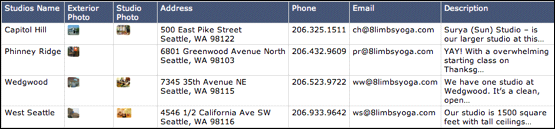
Studios directory for a Yoga Center
This Studios directory:
In the second picture, you see a view of the Studios directory as published on the Yoga Center website.
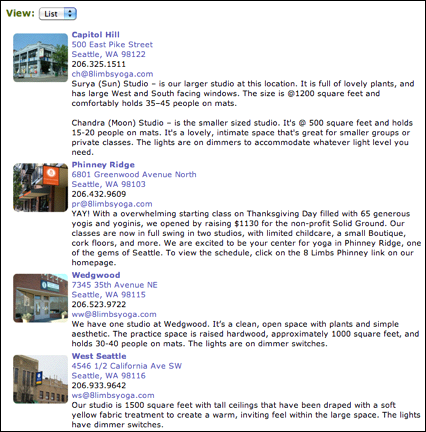
Published view of the Studios directory
TIP: To display the images in the directory with associated event details
To display the images included with the records (such as for "Capitol Hill" or "Phinney Ridge" in the picture above) in associated event detail pages, you must set both of the following controls:
1) On the tab for the directory (or object) in the Trumba editing environment, go to Define Fields and Objects, then the directory's Image field, and then in Settings, select the Show this field with event details (when linked to an event) control; and
2) On the calendar Events tab, click Publish Settings, then on the Calendar Spuds tab > Event Detail view, click Edit Settings and Styles, and then set the Show field value icons control to Yes.
Both of these settings must be in place to display the images included with the records in associated event detail pages.
Organizing information into custom objects benefits both you and your website visitors in a number of important ways.
By organizing information into subject-based tables, you eliminate redundancy by recording each fact only one time.
This means that there is one place to enter and maintain each record. Changes you make in that one place ripple out automatically to all other places where the information appears.
For example, if you maintain and update information about event venues in a Venues object, you eliminate the need to re-type and map venue data in each event you create.
Objects eliminate the need for repetitive data entry.
This reduces errors and results in a higher quality of information across your website.
For example, if you maintain information about event venues in a Venues object, you enter data about each venue only one time. You can display venue data in any number of published views by referencing records in the Venues object.
Each object can be displayed on its own webpage and presented in one or more custom views. You can accompany the published views with Control spuds to make the information easier to search and filter.
In many cases, published views of objects can replace existing webpages, eliminating the need for time-consuming, expensive site maintenance.
The ability of custom objects to reference one another combined with Trumba spud technology creates an interconnected web of information that visitors can easily navigate through links, detail popups, and more.
These connections enhance your existing site navigation and create new navigation options for website visitors.
You can publish the information stored in a custom object in one or more views tailored specifically to the type of information you're presenting.
To help visitors discover the published view, you can embed a promotion spud on key pages throughout the site.
By accompanying published views with control spuds, you allow site visitors to choose the view that best suits their needs, filter the information by category, and search for specific records.
If you have already used Trumba Connect to create a website calendar, it may have occurred to you that calendars satisfy the criteria described in the definition of a custom object.
As you can see in the following published view of one section of the Yoga Center calendar, each event is a unique record with a set of attributes such as start time, end time, and location. Calendars actually function as a special class of built-in objects.
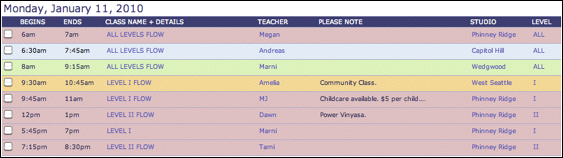
Published view of the Yoga Center calendar
Custom objects benefit from the same functionality that makes Trumba calendars so powerful. For example, for each custom object you publish:
Each custom object is useful in and of itself and each object spud can be embedded independently into a webpage. But the true power of objects lies in their relationships with one another.
This can be demonstrated from:
Suppose the Yoga Center creates the following objects:
This image illustrates potential relationships among the objects.
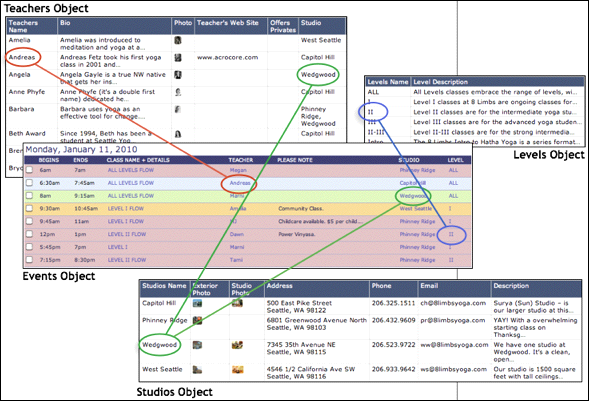
Relationships among Yoga Center objects
As described earlier, each custom object includes an attribute column that uniquely identifies each record the object contains. For example, the Studios object includes a column called Studios Name that uniquely identifies each studio.
By including the unique attribute column from the Studios object in other objects, the Yoga Center can reference studio records from within other records.
For example, in the image, the green lines indicate the relationships between the Studios object and the Events and Teachers objects. Each event in the Events object (calendar) occurs at a specific studio. Each teacher in the Teachers object offers classes at one or more studios.
The studio information lives in only one place—the Studios object. Because it is stored in an object table, the studio information can be used again and again by any other objects the Yoga Center creates.
The relationships between objects, in combination with Trumba spud technology, benefit site visitors by making it easy for them to move between published views to locate the information they need.
For example, a visitor to the Yoga Center website can go directly either to the published calendar or to the published Studios view.
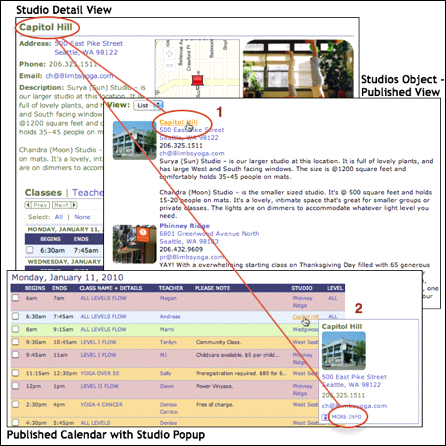
Related information about Yoga Center studios
From either of these published views, the visitor has direct access to details about a specific studio by:
