Conference Schedule calendar view
Use when your goal is to
- Present the events that take place over the course of a limited number of days.
- Group each day's events by location (for example, all events that take place in the same room or building) or description (for example, all events of the same type).
Don't use when your goal is to
- Group events by time period, such as by week or month.
- Include images with events.
- List events in descending order, with latest events displayed first.
- Present event information in a traditional calendar format.
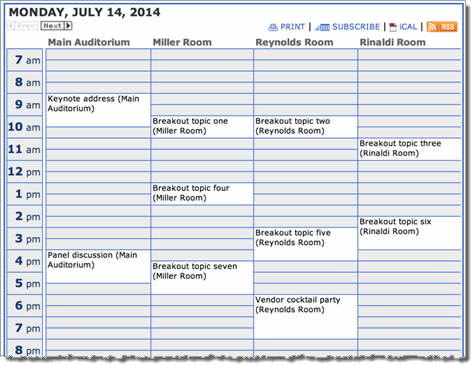
Description Each page of the published calendar displays the events that take place on just one day. Events are grouped in columns by location or description.
Example
Settings to notice
- The calendar shows the events for a single day. Visitors can move between days by clicking the previous and next icons.
- A scale along the left lists hour-long time blocks.
- The day's are listed in columns. Each column is a location.
- To see more details about events, visitors click the event titles.

