News calendar view
Use when your goal is to
- Create an on-going record of date-related information (for example, recent product updates or links to conference highlights), with the most recent date displayed first.
- Communicate timely information in a blog-like format rather than promote events that you want people to attend.
- List events in descending order, from latest to earliest.
Don't use when your goal is to
- List events in the more typical ascending order, with earliest events displayed first.
- Group events using regular or custom time blocks.
- Feature specific events by adding unique formatting.
- Present event information in a traditional calendar format.
Description Each event is a date-related communication. Events are listed in descending order and can include images.
You can control which event fields display in the calendar, the order in which they appear, and how some fields are labeled. You can also set the number of events per page and whether the default page starts with events from the current, previous, or next day.
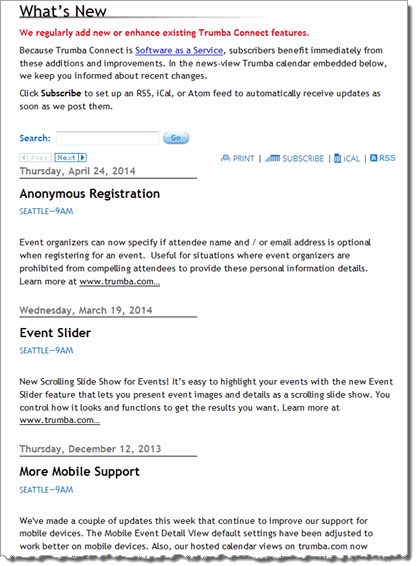
Example What's New in Trumba calendar
Settings to notice
- The most recent events display first.
- The event date appears at the top of each entry above the event title.
- Paragraphs in the description field add context, explain the significance of each entry, and link to related information.

