
What you can learn in this topic
The Address Book in Trumba® Connect is a collection of names and email addresses.
The Address Book is just one of many groups that you can create. A group is any collection of contacts that serves a particular purpose. For example, a group might include the contacts to whom you send a scheduled calendar email message. Or, you might create a group of the people with whom you share a particular calendar. Groups correspond to distribution lists in Microsoft® Office Outlook® and other email programs.
While in most ways the Address Book acts like any other group, it has some unique properties.
Contacts added to these other lists and groups automatically appear in the Address Book group.
Note The Address Book group is a complete list of your contacts but it is not a master list. If you delete a contact from the Address Book, you do not simultaneously delete it from calendar email distribution lists, sharing permission lists, and any other groups to which it belongs. To definitively purge a contact, you must delete it from each list or group where it appears.
In the Address Book location, you can create any number of other contact groups, for example:
If the below criteria are true, the Organizers group appears by default in the Trumba Connect Address Book:
OR:
You set up response notifications for an event created before the launch of the Organizers section in the Registration tab (on October 28th 2015), and then re-saved that event. (Prior to re-saving the event, response notifications continue as before.) In this case, you'll see the former notification receivers transferred to the Organizers group, and the Send notifications option selected on the Registration tab by default, so that the notifications continue as expected.
Organizers serve in the following two roles:
The Organizers group automatically includes anyone assigned as an organizer for any published event, for easy selection on future events. If you add organizers to the Address Book directly, they're available immediately for assignment to any future event that uses event registration.
You can manage the members of the Organizers group through the normal Address Book functions, but it's important to understand how the group operates:
If you delete an organizer from an event, even if that person is no longer currently associated with any event, they stay in the Organizers group, and thus remain available for assignment to other events. To remove them altogether, follow the steps in How to delete contacts from groups.
If you remove organizers from the Organizers group, they remain assigned as organizers on any events where they are already assigned. Even if you remove them from all groups, including the Address Book top-level group, they stay assigned to any events.
No, updating events with that organizer already assigned won't add him or her back into the Organizers group again, and that organizer remains assigned to the event.
If, however, you add that same organizer back onto an event from which he or she had been removed, or you assign them to an event to which he or she had never been assigned, they are added (or "re-added") to the Organizers group.
To manage your contact groups, go to the Address Book location.
A new group named Group 1 (or Group 2 if a group named Group 1 aleady exists) is added to the Groups list.
Tip After you click Address Book or another group, the new group name becomes a hyperlink.
How do I add contacts to a new group?
I don't want to delete the entire group. I just want to delete some contacts in the group.
You can delete contacts from groups at any time. If a contact occurs in more than one group, you must delete the contact from each group to eliminate it altogether.
I don't want to delete the contacts altogether. I just want to move them from one group to another.
Or, to select all the email addresses, for Select, click All.
Tip Deleting a contact from the Address Book group does not simultaneously delete it from every calendar distribution list. If you want to stop sending a calendar email to one or more contacts, remove those addresses from the calendar's distribution list.
You can add contacts to groups in different ways:
 preceding contacts in the Address Book and other groups. The symbol indicates that the contact is a Trumba account holder.
In addition, if you want to import a large number of contacts, we recommend that you import them in batches of no more than a couple of hundred at a time.
Trumba Connect groups accept email addresses in standard internet (SMTP) name@domain format. If you try to add an email address in some other format, you'll get an error message.
To add one or more contacts by typing or pasting email addresses
If the contacts that you want to add to one group already exist in another group, you can copy them from one group to another. Or, if you no longer want the contacts in the original group, you can move them to the new group.
Note Because the Address Book group is a comprehensive list of all of your contacts, you can copy contacts from the Address Book to other groups but you can't move contacts from the Address Book to other groups.
To add one or more contacts by copying or moving them from another group
Note If the group you're copying from is the Address Book group, you won't see Move to group in the drop-down list.
The group I want to copy or move the contacts to doesn't exist yet
Invalid email addresses appear in the Address Book with red exclamation marks (see the image below). Invalid email addresses are those to which Trumba has tried to deliver email (such as for event registration and calendar digest emails), but the email was returned as undeliverable (i.e. bounced). (For more information, see About invalid email addresses and bounced flags.)
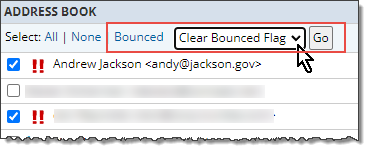
If you believe that one or more of the email addresses was incorrectly flagged as invalid, or have since been repaired, you can clear the bounced flags for any number of selected addresses, all at once. After the bounced flags are cleared, Trumba will again attempt to deliver email to those addresses.
To clear bounced flags in the Address Book
The invalid addresses need to appear in the Address Book before you can select them, and then clear their bounced flags. See: How to add contacts to your Address Book or another group.
The red exclamation marks are cleared. If a new attempt to deliver email to one or more of the addresses fails again, the red exclamation marks reappear.
Invalid email addresses appear with red exclamation marks. Invalid email addresses are those to which Trumba has tried to deliver email (such as for event registration and calendar digest emails), but the email was returned as undeliverable (i.e. bounced).
Note Trumba may be unable to deliver email for any one of several reasons, including: the email account was deleted, the recipient's email inbox was full, the incoming email was blocked as spam, or the recipient organization's email service was down.
After an email address has been flagged as invalid, the address appears with red exclamation marks, and Trumba stops attempting to deliver any email to that address.
If you believe that one or more of the email addresses was incorrectly flagged as invalid, or have since been repaired, you can clear the bounced flags. After the bounced flags are cleared, Trumba will again attempt to deliver email to those addresses.
Important To avoid having email addresses flagged as invalid again in the future, contact your organization's IT department to ensure that emails arriving from Trumba are not blocked as spam (i.e. they are added to your organization's safe list -- see An Internet Service Provider (ISP) or email client is treating Trumba messages as spam).
You can edit the display name for any contact with an email address that is not associated with a Trumba account. You can also add display names for contacts listed with only an email address.
Tip Trumba account holders have this symbol before their display names.
An edit box appears. The box contains the current display name, if there is one, or is blank, if no display name currently exists.

