
While you can't synchronize a Trumba® calendar and an Apple® iCal® calendar, you can:
This topic explains how subscribing and publishing work. For an explanation of how to subscribe to a Trumba calendar, see Subscribe from iCal. For an explanation of how to publish an iCal calendar to Trumba Connect, see Publish an iCal calendar.
In iCal, you can subscribe to any:
A non-published calendar is any calendar in your account to which you have edit rights that you haven't published to the web.
Calendars that you can edit include calendars that:
When you subscribe from iCal to a non-published Trumba calendar that you can edit:
To learn more about private events, see Private events.
When you subscribe from iCal to a published Trumba calendar, you can choose to subscribe to all events you see on the calendar, including events from other calendars that are mixed in to the published calendar.
Or, you can subscribe only to events on the published calendar itself.
Usually, when events from other calendars are mixed in to the published calendar, you'll see a mix-in control like this to the right of the calendar:
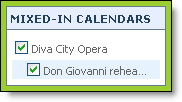
In this example, Diva City Opera is the published calendar. Events from the Don Giovanni rehearsals calendar are mixed in to the Diva City Opera calendar.
You can subscribe to this calendar so that your iCal calendar contains events from both the Diva City Opera and Don Giovanni rehearsals calendars or just the Diva City Opera calendar.
For details about how to subscribe to a published calendar with or without mix ins, see Subscribe from iCal.
You can publish any calendar you create in iCal to Trumba Connect. As part of the publishing process, you'll be asked to provide your Trumba Connect sign in email address and password.
When you publish, the publishing process makes everything in the Trumba calendar match the iCal calendar.
This means that:
You don't have to worry about duplicating events on the Trumba calendar. Each subsequent time you publish from iCal, existing iCal events on the Trumba calendar are left alone, unless you updated the events in iCal.
After you publish the iCal calendar to Trumba Connect, you'll find the published calendar along with other calendars you've created in your Trumba calendar list.
See Best practices for publishing iCal calendars to Trumba Connect for some publishing tips.
