Add events
This topic covers the basic methods for adding events to your Trumba® calendars, including:
Related topics:
For more information about the following types of events, go to:
Adding a single event
How you add an event can differ, depending on the current view.
How to add an event
- Select the calendar to which you want to add an event. (When a calendar is selected, its name turns bold, and a check mark appears in its check box.)
- Open the add/edit event form, using one of the following methods:
- In any view, click Add Event above the calendar.
- In the any of the day views, click the row for the time that you want the event to begin.
- In the Month view, click the plus (+) symbol in the upper-right corner of the date block.
- On the add/edit event form, on the Event Information tab, choose the template you want to use, if available. (If the calendar has only one template, it's selected by default.)
Important The Event Information tab includes the fields that are available for the selected event template. (See Modify and create event templates.)
- If the Also Shows On field appears above the title, you can select the additional calendars to which you want to add the event.
- Type a title and location (and add a map link if you want).
- Specify the event start time and end time, for example:
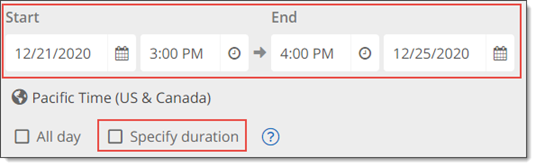
or
Click Specify duration to set the duration rather than the end time, for example:
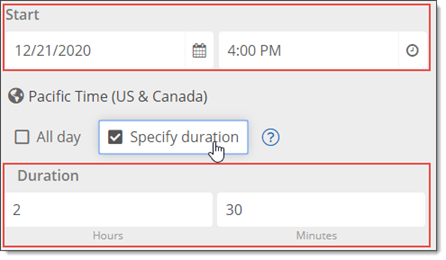
(To create an event with no end time, set the Duration to 0.)
Tip To set a default duration for new events (and save time for event editors), in the Trumba editing environment, go to Calendar Settings for the owning calendar, and then under Default Event Settings, set the default duration for new events.
(Note: Event editors can always update the duration when creating or editing the event.)
- Click Repeat to set up a repeating event. For more information, go to Add repeating events.
- In the Event image field, you can add an image to the event. For more information, go to Add images to events.
- In the Featured events field (if included), select the featured level for this event. For more information, go to Featured event fields.
- For Description, provide additional information about the event.
Note You can use the toolbar at the top of the field (and any text field with the toolbar) to format the text, add images, insert links to URLs, and more. See: HTML editor.
- For the optional Web link field, you can type the address (URL) of a website where viewers can find additional or related information.
- Populate any remaining fields, as appropriate.
- (Optional) Click Preview at the bottom of the form to see a preview of the detail page for the new event. You can update the event information and preview the results as often as needed prior to saving the event.
Note When previewing a new event, since it hasn't yet been saved, you may see inconsistent results when clicking event action or other links in the preview window. New events, for example, won't appear on the calendar when clicking the Back to Previous View link.
- Click OK to save your changes and return to your calendar.
Return to top
Adding events from one calendar to another
You can add an event you create on one calendar to any other calendar, as long as it's been shared with you with the appropriate permissions. For more information, go to About sharing calendars.
The event continues to be owned by the calendar where it was created, but appears on both calendars.
Adding events from one calendar to another is most helpful in the following scenarios:
- You want to include the SAME event, rather than a duplicate of the event, on both calendars.
If you want to create an independent, separate event, which can be edited separately from the original event, you should copy (not add) the event to the other calendar. For more information, go to Copy events.
- You want only selected events from the parent calendar to also appear on another calendar, rather than all of the events.
If you want ALL of the events from one calendar to appear on another calendar, it's best to "mix in" the entire calendar. For more information, go to Mix-ins, paging, and grouping.
- You want to also publish the selected events to the publish path (URL) associated with the other calendar. For more information, go to Publish calendars.
- You want to share the selected events for editing with someone else who has access and appropriate permissions on the other calendar, but not the parent calendar. For more information, go to About sharing calendars.
Add a single event from one calendar to another
If you have the appropriate sharing permissions for a calendar, you can use the Also Shows On feature to add single events from one calendar to another. For more information, go to Also shows on vs. mixing in.
- Add a new event, or open an event for editing.
- In the Also Shows On field above the title (if you have the appropriate permissions to display it), select the additional calendars to which you want to add the event.
Add multiple events from one calendar to another in List view
When you want to add more than one event from one calendar to another, it's quickest to use the List view.
- Open the calendar that holds the events that you want to add to another calendar.
- Click List above the calendar to see the events in List view.
- In the event list, select the check boxes next to the events that you want to add to another calendar.
- In the Select an action drop-down list, click Add events to, and then in the Select a calendar drop-down list, click the calendar to which you want to add the selected events.
- Click Go.
To remove an event from another calendar
If you have the appropriate permissions, you can also use the Also Shows On feature to remove single events from another calendar.
- Open an event for editing.
- In the Also Shows On field above the title (if you have the appropriate permissions to display it), deselect the calendars from which you want to remove the event.
Tip To remove multiple events all at once, open the calendar that holds the events that you want to remove. In the List view, select the check boxes next to the events that you want to remove. In the Select an action drop-down list, click Remove events from [calendar name], and then click Go.
Return to top
Adding events from a calendar created in another program
You can add events from calendars created in programs such as Microsoft, iCal, Google, or Yahoo! to a calendar you create in Trumba Connect by exporting the events from the other calendar program, and then importing them into Trumba Connect.
For more information, go to: Import events.
Return to top

